AI Note Taker·Free, no bot, no sign-up
Listen. The notes write themselves.
In a call, class, or webinar, stop splitting yourself between listening and typing. It hears what's said on your computer and writes the notes on the page as it goes: key points, decisions, and to-dos. When it ends, download a PDF.
What are you listening to?
Taking notes on a call or a video? Open this page in Chrome or Edge on a computer, which can hear what's playing.
- Free, no minutes limit
- No bot joins your call
- Audio never leaves your device
What you get
The notes you'd take if you weren't busy listening
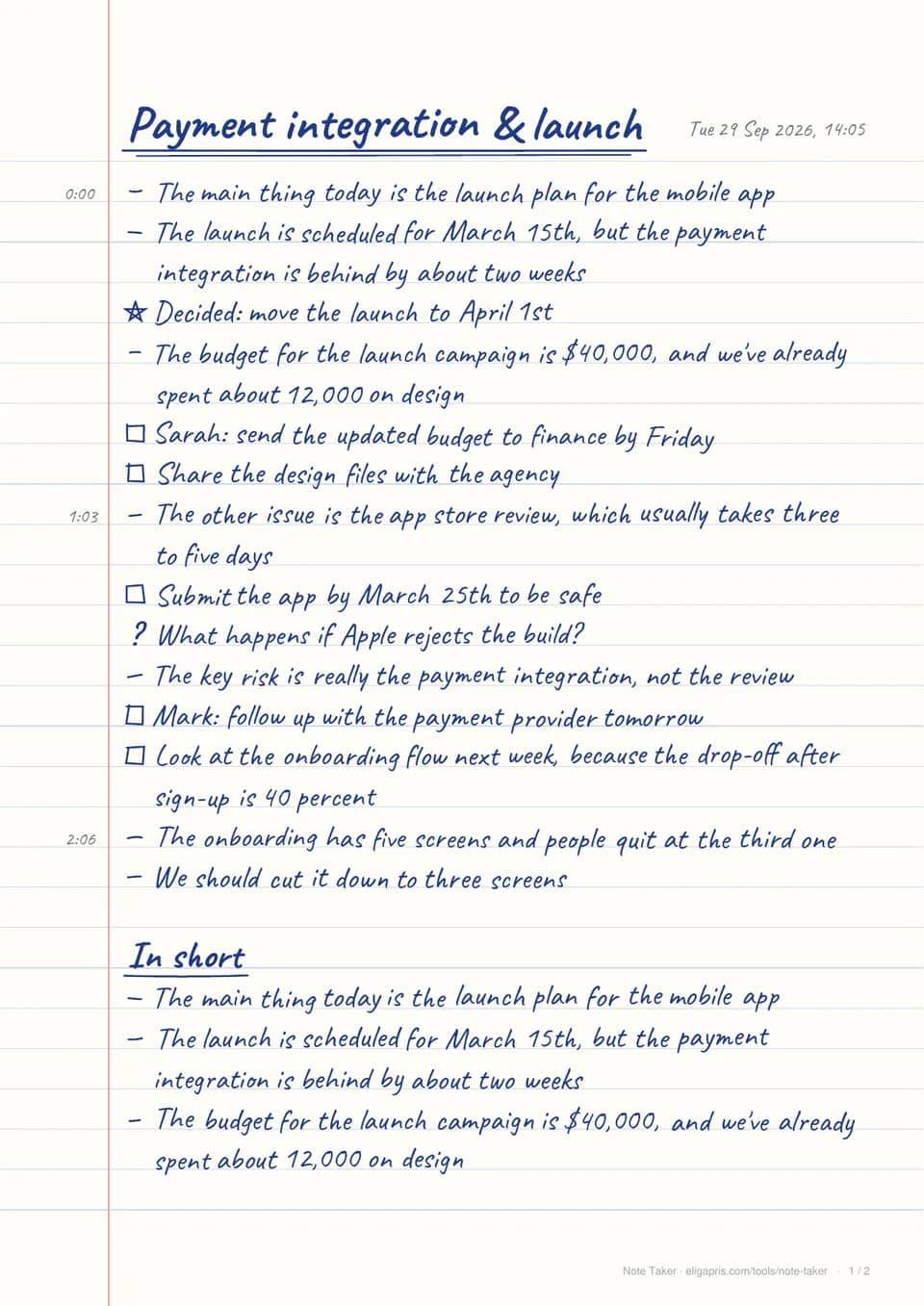
This page was written from a three-minute planning call. Small talk, the ums, and the back-and-forth are gone. What's left is what you'd want on paper:
- –Key points the talk kept coming back to, with numbers and names intact
- ★Decisions marked, so nobody re-argues them next week
- ☐To-dos with who and by when, collected again at the end
- 1:03Times in the margin to find any moment in the full transcript
This is local AI. The same approach runs private assistants, search, and document processing on your own hardware, with no data sent to an AI provider.
Local AI for your businessHow it works
Three steps. The first one is the only one you do.
- 1
Say what you're in
A call, a webinar or class, or a talk in the room. One click, and it starts listening.
- 2
Just listen
Notes appear in handwriting as things are said, with the time in the margin. Nothing to type, nothing to watch.
- 3
Take the PDF
Stop when it ends. A summary and every to-do are added, then download the page or copy it anywhere.
Why use it
Worth it from the first meeting
Get the hour back
No typing during the call, no rewatching the recording to find what was agreed. The notes are done when the meeting is.
Be in the conversation
Look at people, think, ask the better question. Your attention goes to the talk, not the keyboard.
To-dos that don't slip
Who's doing what, and by when, becomes a checklist on the page, and is collected again at the end.
No bot joins your call
Nothing to invite and nothing announcing itself in the meeting. It hears the call on your own computer.
Private by design
Board meetings, client calls, medical and legal talks: nothing is uploaded, so confidential stays confidential.
Same page, every time
Notes follow fixed rules, not a chatbot's mood: the same talk always gives the same notes and the same PDF. Free, with no minutes cap.
Your calls stay on your device
The speech model (OpenAI's open Whisper) runs inside your browser, and the notes are written there too. Your audio, transcript, and notes never leave your device, and your last session is saved only in this browser. The model downloads once, from this site. We count anonymous usage (the kind of session, its length, the language heard, browser, and IP) to keep the tool improving.
Read exactly what we recordFAQ
Questions people ask
How do I take notes on a Zoom, Google Meet, or Teams call automatically?+
In Chrome or Edge on a computer, choose “A call or online meeting”, pick the call's tab (or your screen), and switch on audio. It hears both sides and writes notes as the call goes. Headphones stop your own voice being picked up twice.
Does a bot join my meeting?+
No. Nothing joins, nothing is invited, and nothing shows in the call. It listens to the audio already playing on your computer.
Should I tell people I'm taking AI notes?+
Yes, it's good practice, and in some places the law requires consent before recording or transcribing a conversation. Nothing is uploaded or kept by us, but the people you're talking to deserve to know.
What do the notes include?+
The key points, every decision (marked with a star), every to-do with who and by when (as a checklist), and real questions that were asked. Longer sessions end with a short summary and all the to-dos in one list.
Can I use it for lectures and classes?+
Yes. For a class in the room, choose “A talk in the room” and it uses your microphone. For an online class or webinar, choose “A webinar, class, or video”. Homework and deadlines are picked out as to-dos.
Can I get notes from a recording?+
Yes. Drop an audio or video file (a recorded call, a lecture, a voice memo) and the notes are written as the recording is heard.
What happens if I close the tab?+
Your notes are saved on this device as they're written. Come back to this page and open your last notes: you'll get the identical page and PDF.
What can I download?+
The handwritten page as a PDF, the notes as Markdown (for Notion, Obsidian, or Docs), or the full transcript. Or copy the notes as text.
Which languages does it support?+
It hears 99 languages. Key points work in any of them; decisions and to-dos are picked out best in English.
Does it work on my phone?+
Yes, for a talk in the room, using the microphone. Hearing a call or video playing on the device needs Chrome or Edge on a computer.
Is it really free?+
Yes. No account, no trial, no monthly minutes. It runs on your own device, so it costs us nothing per meeting.
More free tools
Also free from Eligapris
Passport, visa, and upload photos
Photo Resizer
Pick where the photo is going (passport, visa, or a size limit) and get a file that passes, first time.
OpenStrip hidden data from files
Metadata Remover
Remove GPS location, camera details, and author names from photos, PDFs, and documents.
OpenSee what a file reveals
Metadata Viewer
See where a photo was taken, which device made it, who wrote a document, and whether it says it's AI.
OpenWant tools like this in your own product?
Eligapris builds fast, private web apps and on-device AI. The same engineering behind AI Note Taker, for your team.